
The fastest way to drive CRM adoption is to treat the rollout as a change-management program, not a software install. Run a 2 to 4 week pilot with representative users, configure the system around real workflows instead of generic defaults, train by role, and govern the whole thing with measurable adoption gates at 30, 60, and 90 days. Skip any one of those four pieces and adoption stalls within a quarter.
TL;DR:
- A successful CRM rollout hinges on a change-management approach, including a pilot, role-based training, and measurable adoption gates at 30, 60, and 90 days.
- Prioritizing workflow-focused configuration and early stakeholder mapping prevents common adoption stalls caused by poor system alignment and data messiness.
- Conducting a 2 to 4-week pilot with real users helps identify configuration issues, workflow friction, and critical blockers before full-scale deployment.
- Post-launch, continuous support through microlearning, champions, and regular data reviews sustains momentum and prevents gradual erosion of adoption.
- Tracking activity depth and deal progression, rather than login frequency alone, provides a clearer picture of actual CRM engagement and system value.
Table of Contents
- Top Tactics At A Glance: What To Prioritize Right Now
- Before You Buy Or Configure: Getting Ready For Rollout
- Pilot And Phased Rollout: The Exact Plan That Works
- Training, Champions, And Support After Launch
- What To Measure: Leading Indicators And Governance Gates
- Keeping The Momentum: Monthly Reviews And New Features
- Common Blockers And 24 To 72-Hour Fixes
- A Broker's-Eye View On CRM Adoption In CRE Workflows
- Sources
- FAQ
Top Tactics At A Glance: What To Prioritize Right Now
Most CRM rollouts don't fail because the software is bad. They fail because leadership treats configuration as the finish line instead of the starting point. The tactics below are ranked by how fast they move the needle, and each one has a next step you can act on this week.
- Leadership modeling: Run every pipeline review off the CRM dashboard, not a spreadsheet, and have managers cite CRM numbers out loud in meetings. If leadership doesn't live in the tool, nobody else will either.
- Pilot cohort: Pick several reps across different roles and tenure levels, then run a focused pilot lasting a few weeks before touching the full team.
- Adoption owner: Name one person with real authority over the rollout for at least 90 days. A committee with no single owner is how rollouts drift.
- Role-based training: Replace generic feature tours with 60 to 90 minute workflow workshops built around each role's actual job, backed by 5-minute microlearning refreshers.
- Workflow-first configuration: Strip required fields down to what the business genuinely needs, and build default views by role so reps aren't hunting through irrelevant tabs.
- Automation: Sync email and calendar activity automatically and automate routine task creation so reps aren't manually logging every call. Salesforce's adoption guidance points to integration depth as one of the biggest levers for cutting manual entry.
- Peer champions and incentives: Small, frequent rewards and public recognition beat one big annual prize.
- Data governance: Lock in required fields, deduplication rules, and a data steward role before go-live, not after the data is already messy.
Each of these tactics reinforces the others. Automation without training just creates confused reps clicking through unfamiliar screens faster.
Before You Buy Or Configure: Getting Ready For Rollout
CRM implementation best practices all point to the same uncomfortable truth: the work that matters most happens before anyone logs in. Skipping the readiness phase is the single most common reason adoption stalls in the first 90 days.
- Run a readiness audit. Map every system the CRM needs to talk to (email, calendar, dialer, marketing automation) and check integration depth. Note the actual technical comfort level of your team, not the level you assume they have. Catalog where deal and contact data currently lives, because migrating messy data into a new system just moves the mess.
- Build a stakeholder map. You need an executive sponsor who will publicly back the rollout, a program lead with day-to-day authority, RevOps or IT for technical execution, sales managers who reinforce behavior on the ground, and a handful of peer champions embedded in the field.
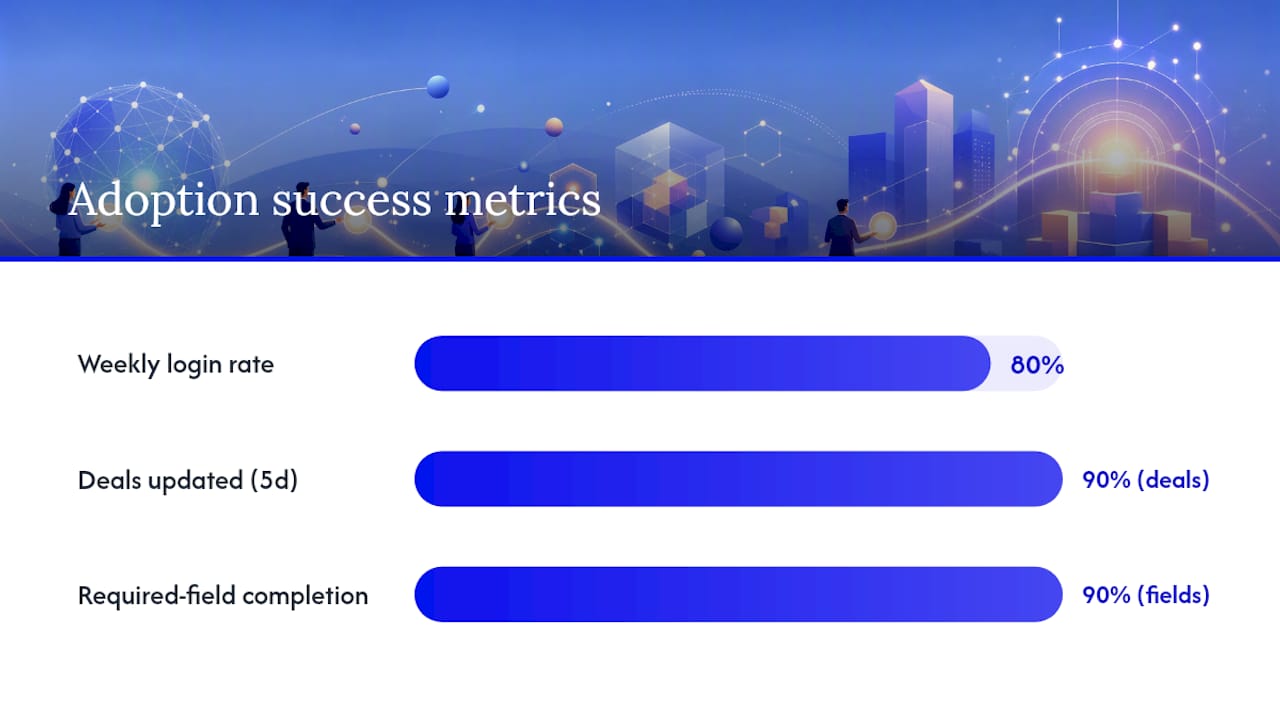
- Define adoption success metrics tied to business outcomes, not vanity numbers. "80% weekly login rate" means little on its own. Pair it with something like "90% of active deals updated within 5 business days" and "required-field completion above 90%" so you're measuring behavior that actually protects pipeline accuracy.
- Map real workflows before configuring anything. Sit with two or three reps and document how a deal actually moves from first contact to close. Build a minimum viable pipeline with only the stages and required fields that reflect that real process. Deal pipeline stage design matters more here than any feature list, since a pipeline that doesn't match how deals actually move gets abandoned within weeks.
- Set a governance cadence on day one. Put 30, 60, and 90-day review dates on the calendar before launch, not after problems surface. HubSpot's change management framework recommends weekly adoption stand-ups through the first 90 days, monthly steering committee check-ins through year one, and quarterly data governance audits after that.
Pro Tip: Interview your two most skeptical reps before configuration, not after launch. Their objections almost always point to the exact workflow friction that will sink adoption for everyone else.
Skipping this phase to "just get started" is the most expensive shortcut in the entire process, because every workaround your team invents during a rushed launch becomes a habit you have to unwind later.
Pilot And Phased Rollout: The Exact Plan That Works
A short, cross-functional pilot with real users catches the configuration and workflow problems that a demo or a QA checklist will never surface, because pilots use live deals instead of test data. Rework's implementation guidance treats the pilot as a real-world stress test, not a formality before the "real" launch.
Run the pilot for 2 to 4 weeks with 6 to 20 representative users spanning different roles and seniority. Set clear goals before day one and open a dedicated Slack channel or standing feedback thread so friction gets reported the moment it happens, not weeks later in a survey nobody fills out.
| Pilot Metric | Target | How To Measure |
|---|---|---|
| Daily login rate | a high percentage | Active user logins divided by pilot cohort size, tracked daily |
| Deal update frequency | At least weekly per active deal | Timestamp on last field or stage update per deal |
| Required-field completion | a high percentage | Percentage of required fields populated across pilot records |
| Blocking workflow issues | a small number open at pilot close | Count of issues tagged "blocking" in feedback log |
- Classify every piece of feedback as blocking or nice-to-have. A blocking issue prevents a rep from completing a core task, like logging a deal or updating a stage. A nice-to-have is a preference, like wanting a different field order.
- Fix every blocking issue before scaling. This is the rule teams break most often, and it's the one practitioner playbooks flag as the costliest shortcut: two weeks with three reps will catch most of what would otherwise derail a 30-person rollout.
- Run a go/no-go review against your pilot metrics table. If daily login, update frequency, and field completion all hit target, and blocking issues are cleared, move to full rollout. If not, extend the pilot rather than launch broken workflows to everyone at once.
- Communicate the decision clearly. Tell the full team what changed based on pilot feedback. This single step does more for buy-in than any launch announcement, because it proves the pilot actually mattered.
Training, Champions, And Support After Launch
Role-based, workflow-focused training beats generic feature tours because reps only retain what maps directly to their job. Vantage Point's adoption research found that short, scenario-based workshops paired with ongoing microlearning outperform long onboarding sessions that try to cover every feature at once.
A simple 30/60/90 learning plan works well. In the first 30 days, run role-specific workshops of 60 to 90 minutes using real deals and real data, not hypothetical demo scenarios. By day 60, layer in 5-minute microlearning snippets tied to specific workflow moments, like updating a deal stage or logging an activity. By day 90, shift toward peer-led refreshers where champions walk teammates through their own shortcuts.
- Track training completion on a dashboard managers actually check weekly, not a report that sits unopened in an inbox.
- Use in-app guidance and tooltips for the moments reps get stuck, rather than sending them back to a manual.
- Select peer champions based on genuine enthusiasm and influence with peers, not seniority alone.
- Give champions a defined role: answering quick questions, flagging friction to the program lead, and demoing new workflows in team meetings.
- Run weekly adoption stand-ups for the first 90 days, then shift to a lighter monthly cadence.
- Hold regular office hours where reps can bring real problems instead of hypothetical ones.
Pro Tip: Build your knowledge base around the five workflows reps hit most often in their first week, not a comprehensive feature index nobody will read end to end.
Champions who feel ownership over the rollout, rather than just recipients of a mandate, tend to keep advocating for the system long after the formal training period ends.
What To Measure: Leading Indicators And Governance Gates
Login frequency alone is a misleading adoption metric. A rep can log in daily and still avoid updating deals, skip required fields, and never touch the forecast. HubSpot's sales adoption research recommends pairing login frequency with depth-of-activity measures so you're tracking real usage, not just presence.
The indicators worth watching:
- Activity logging rate: percentage of calls, emails, and meetings actually recorded in the system versus estimated real activity.
- Deal update frequency: how often active deals get touched, ideally weekly at minimum.
- Required-field completion: percentage of mandatory fields populated across live records.
- Stage progression consistency: whether deals move through stages in the expected order without skipped or reversed steps.
- Forecast participation: percentage of reps who submit forecast updates on schedule.
Pull most of these directly from standard CRM reporting: a saved view filtered by "last activity date" surfaces stale deals fast, and a required-field completion report usually exists as a built-in dashboard component. A pipeline dashboard built around these numbers turns a weekly pipeline review into a genuine adoption check rather than just a revenue conversation.
Set adoption gates tied to those 30, 60, and 90-day review dates. At 30 days, the program lead and executive sponsor sign off on whether pilot-level metrics are holding at team scale. At 60 days, sales managers own a review of stage progression consistency and flag reps who need coaching. At 90 days, RevOps and the executive sponsor jointly decide whether the rollout is stable enough to shift from weekly stand-ups to monthly steering.
When a metric misses target, the corrective action should match the cause. Low required-field completion usually means the fields are wrong, not the reps. Low deal update frequency often points to a workflow that takes too many clicks, which calls for a configuration fix, not another training session.
Keeping The Momentum: Monthly Reviews And New Features
Adoption doesn't end at day 90. It either keeps compounding or it quietly erodes, and the difference usually comes down to whether anyone keeps tending to it.
- Run monthly "fix-it" sessions where users vote on small changes to the system. Practitioner experience consistently shows that voting-driven improvement cycles build trust faster than top-down changes, because reps see their input actually shaping the tool.
- Schedule quarterly data hygiene audits. Prune fields nobody fills in, retire automations that no longer match the workflow, and rerun deduplication rules. Validity's research on CRM data quality found that weak data hygiene steadily erodes user trust in the system, and once reps stop trusting the data, they stop entering it.
- Introduce advanced features only after baseline adoption is stable, and only with dedicated training. Rolling out AI underwriting tools or predictive scoring before reps have mastered basic pipeline hygiene just adds confusion on top of an already shaky foundation.
- Keep incentives light but consistent. A recurring small reward for the most complete pipeline beats a single big annual prize that most reps forget about by March.
Pro Tip: Put "fix-it" session outcomes in writing and share them team-wide within 48 hours. The speed of the response matters more than the size of the fix.
Common Blockers And 24 To 72-Hour Fixes
Most adoption problems have a fast, specific fix if you catch them early.
- Reps skip required fields because there are too many. Cut the list to what the business genuinely needs and remove the rest within 24 hours.
- Deals go stale because updating them takes too many clicks. Simplify the update flow before scheduling more training.
- A vocal rep resists the system and influences others. Schedule direct coaching within 72 hours, and involve a peer champion, not just a manager.
- Data looks unreliable because deduplication rules were never set. Assign a data steward and run a cleanup pass immediately.
- No one owns the rollout. Reassign a clear adoption owner with real authority before the next stand-up.
If more than two of these show up at once, pause the full rollout and return to pilot conditions with a smaller group until the fixes hold. If it's an isolated issue, fix it in production and monitor the next week's metrics rather than restarting the whole process.
A Broker's-Eye View On CRM Adoption In CRE Workflows
Watching commercial real estate broker teams adopt new systems, the pattern is remarkably consistent: the teams that succeed treat the CRM as the record of the deal, not paperwork attached to the deal. When pipeline visibility, lender conversation tracking, and deal packaging all live in one place, reps stop re-entering the same information three different ways.
The teams that struggle usually skipped the workflow-mapping step and inherited a generic sales pipeline that doesn't reflect how commercial loan deals actually move through underwriting and lender outreach. Adoption strategy in this business isn't really about the software. It's about whether the system matches how a broker actually sources capital and moves a deal forward.
— Theron
Sources
- Rolling Out the CRM: Pilot Team, Full Team, Adoption Tracking — Rework resources
- CRM change management: A practical guide for leaders — HubSpot
- How to Build a Successful CRM Adoption Strategy | Vantage Point
- How to Improve Team CRM Adoption (Practical Playbook) — Sure Send
Brokers evaluating a purpose-built platform rather than a generic sales CRM can see how lender matching, deal pipeline, and document management work together at BrokersConnect, which was built around the commercial mortgage workflow instead of a retail sales process retrofitted for real estate.
FAQ
What Are Some Effective CRM Adoption Strategies?
Run a short pilot before full rollout, configure the system around real workflows instead of generic defaults, train by role rather than by feature, and set measurable adoption gates at 30, 60, and 90 days.
What Are The Four Pillars Of A CRM?
Most frameworks point to contact and account management, sales pipeline tracking, communication logging, and reporting or analytics as the four core functions a CRM needs to deliver value.
What Are The Top CRM Tools?
The right tool depends heavily on your industry and workflow. Commercial real estate brokers, for instance, benefit more from a platform built around loan pipelines and lender matching than a generic sales CRM retrofitted for their process.
How Long Should A CRM Pilot Run?
A pilot of 2 to 4 weeks with 6 to 20 representative users is enough to catch most configuration and workflow issues before they affect a full team rollout.
Why Is Login Frequency A Poor Adoption Metric On Its Own?
A rep can log in daily without updating deals or completing required fields, so login rate needs to be paired with deal update frequency and field completion to reflect real usage.