
Create a deal data room in six moves: pick a platform, name the room, apply a numbered folder skeleton, upload and index your documents, configure tiered permissions with NDA gating and dynamic watermarking, then issue separate scoped invite links per bidder. Done right, a functional room on a modern flat-rate virtual data room (VDR) platform can be set up quickly; enterprise VDR onboarding with vendor admin typically requires several days.
Start now with this checklist:
- Choose a VDR or secure vault with AES-256 encryption, granular file-level permissions, and an immutable audit log
- Name the room generically (never the target company's name)
- Build the numbered folder skeleton before uploading a single file
- Upload and index documents in priority order (executive summary first)
- Configure tiered access groups, enable NDA gating, and apply dynamic watermarking to sensitive files
- Issue a separate scoped invite link for each bidder or reviewer group
Pro Tip: Never send one shared link to all bidders. Scoped links let you revoke access for a single party without disrupting the rest of the process, and the audit log will show you exactly who opened what.
Key Takeaways
A deal data room built on a numbered folder skeleton, tiered permissions, and NDA gating gives deal teams the speed, security, and audit trail that institutional counterparties require.
| Point | Details |
|---|---|
| Build the skeleton first | Create the numbered folder tree (1.0–6.0) before uploading any files to prevent rework and broken Q&A links. |
| Use the onion method | Release access in stages: teaser, NDA-signed, shortlisted, exclusivity; never grant confirmatory access before a formal bid. |
| Issue scoped links per bidder | One link per party lets you revoke individual access cleanly and keeps the audit log readable by counterparty. |
| Archive at close | Export documents, Q&A threads, and audit logs at deal close; a seven-year retention baseline applies to most CRE and M&A transactions. |
| Thecrebrokersconnect automates the workflow | The platform's secure document vault, deal pipeline CRM, and scoped sharing tools handle recurring CRE deal room setup without rebuilding from scratch each time. |
Table of Contents
- How do you create a deal data room that's ready for diligence?
- What should you look for when choosing a VDR?
- How do you build a folder structure that buyers can actually navigate?
- How do tiered permissions and the onion method protect your deal?
- What documents should you upload first?
- How do you run the sharing, Q&A, and reviewer workflow?
- Ongoing best practices: reviews, training, redaction, and compliance
- How much does a deal data room cost, and how long does setup take?
- How does deal-room automation speed up safe setup?
- What experienced deal admins actually do differently
- Thecrebrokersconnect handles the deal room workflow for CRE brokers
- Sources
How do you create a deal data room that's ready for diligence?
Before you upload a single file, answer three questions: What is this room for? Who needs access? And when do they need it?
The use case shapes everything. A sell-side M&A auction needs a three-stage release: a teaser package for screened parties, a fuller data set for shortlisted bidders, and a confirmatory room for the buyer in exclusivity. A Series A fundraising room is leaner, typically 50–200 files covering financials, cap table, product, and key contracts. A lender diligence room for a commercial real estate deal focuses on rent rolls, operating statements, title, and borrower financials. An audit room is different again: it's about completeness and chain-of-custody, not competitive staging.
Map your audiences to access tiers before you touch the platform. A standard three-tier model works for most deals:
- Tier 1 (screened parties): Teaser materials only, no NDA required yet
- Tier 2 (shortlisted bidders): Full commercial and financial package, NDA signed, watermarked
- Tier 3 (exclusivity/confirmatory): Management accounts, employee data, material contracts, IP assignments
Decide early whether you need separate rooms for different audiences or a single room with scoped permission groups. Separate rooms add administrative overhead but give cleaner separation for highly sensitive processes. Scoped groups inside one room work well for most fundraising and mid-market M&A situations.
Before any upload, finalize this scope checklist:
- Confirm the owner list (who can add files, approve Q&A answers, revoke access)
- Draft the NDA text and get legal sign-off
- Build the document request list by audience tier
- Set a go-live date and a diligence deadline
What should you look for when choosing a VDR?
Dedicated VDR platforms include deal-specific features that generic shared drives simply lack: granular file-level permissions, built-in Q&A modules, automatic indexing and OCR, dynamic watermarking, and immutable audit logs. Those aren't nice extras. During a competitive auction, a watermark that traces a leak to a specific bidder's download is the difference between a manageable problem and a blown deal.
Core feature checklist for any VDR:
- Granular file-level permissions (view, download, print, annotate — separately configurable)
- NDA gating at room entry
- Dynamic watermarking (user name, timestamp, IP address embedded in viewed files)
- Immutable audit log with timestamps
- AES-256 encryption at rest and in transit
- Multi-factor authentication (MFA) for all users
- Automatic indexing and OCR for searchability
- Built-in Q&A module with routing and SLA tracking
- Redaction tools and e-signature support
- Email domain allowlisting
Beyond features, evaluate the admin workflow. Bulk upload with drag-and-drop, role templates, and an analytics dashboard that shows file-level engagement are the difference between a room you can manage solo and one that requires a dedicated admin.
Pricing models vary significantly by deal type:
| Pricing Model | Best Fit | Watch Out For |
|---|---|---|
| Flat-rate monthly | Frequent deals, multiple rooms | Overpaying on single-deal use |
| Per-room / per-deal | Rare, high-sensitivity transactions | Costs spike with large file counts |
| Per-GB storage | Small rooms with few files | Expensive for financial model iterations |
| Per-user | Small, controlled reviewer groups | Scales poorly in competitive auctions |
For a CRE broker running multiple financing deals per quarter, a flat-rate subscription almost always beats per-deal pricing. For a one-time sell-side M&A transaction, per-room pricing can be more cost-effective.
Vendor verification checklist:
- SOC 2 Type II or ISO 27001 certification
- Uptime SLA of 99.9% or better
- Data residency options (US-based servers for US deals)
- Export and archive capability (documents + Q&A + audit logs)
How do you build a folder structure that buyers can actually navigate?
Numbering folders (1.0, 2.0, 3.0) preserves a fixed, intuitive structure that resists platform-dependent sorting and keeps reviewers oriented across devices and platforms. Without numbers, most platforms sort alphabetically, which means "Financials" ends up between "Employment" and "IP" depending on the day.
A standard top-level folder skeleton maps roughly to how buyers staff diligence teams:
- 1.0 Corporate — Certificate of incorporation, bylaws, board minutes, organizational chart, ownership structure
- 2.0 Financials — Audited statements, management accounts, 3-year P&L, KPI dashboard, financial model (Excel)
- 3.0 Legal — Material contracts, customer agreements, vendor agreements, litigation history, insurance policies
- 4.0 Commercial / Product — CIM or investor deck, product roadmap, market analysis, top-customer list, pipeline data
- 5.0 HR / People — Org chart, key employment agreements, equity/option schedules, benefits summary
- 6.0 Tax / Regulatory — Tax filings (3 years), licenses, permits, regulatory correspondence, compliance certifications
Each top-level folder should have numbered subfolders. For example, 2.0 Financials might contain 2.1 Audited Statements, 2.2 Management Accounts, 2.3 Financial Model, and 2.4 KPI Dashboard. That granularity lets a financial analyst go directly to 2.3 without opening anything else.
File-naming rules that prevent chaos:
- Use a single date format everywhere: YYYY-MM-DD (e.g., 2025-12-31_AuditedFinancials.pdf)
- Version in place: replace the old file rather than uploading a new copy alongside it
- Never use spaces in file names; use underscores or hyphens inside URLs only
- One source of truth per document type, no duplicates
Pro Tip: Build the entire folder tree before you upload a single file. Starting uploads into a half-built structure forces rework that breaks Q&A links and confuses reviewers who have already bookmarked paths. Drop a one-page index file in the root folder explaining what lives in each section and what's still coming.
How do tiered permissions and the onion method protect your deal?
The onion method works exactly as the name suggests: access peels open in layers as a deal progresses. Screened parties see the teaser. NDA-signed parties see the commercial package. Shortlisted bidders get financials. The buyer in exclusivity gets everything, including employee data and material contracts. Each layer only opens when the deal warrants it, which limits exposure during the competitive phase when leak risk is highest.
Permission matrix for common deal roles:
| Role | View | Download | Annotate | Q&A | |
|---|---|---|---|---|---|
| Internal admin | ✓ | ✓ | ✓ | ✓ | ✓ |
| External legal counsel | ✓ | ✓ | Limited | ✓ | ✓ |
| External financial reviewer | ✓ | Limited | ✗ | ✗ | ✓ |
| Lender reviewer | ✓ | ✗ | ✗ | ✗ | ✓ |
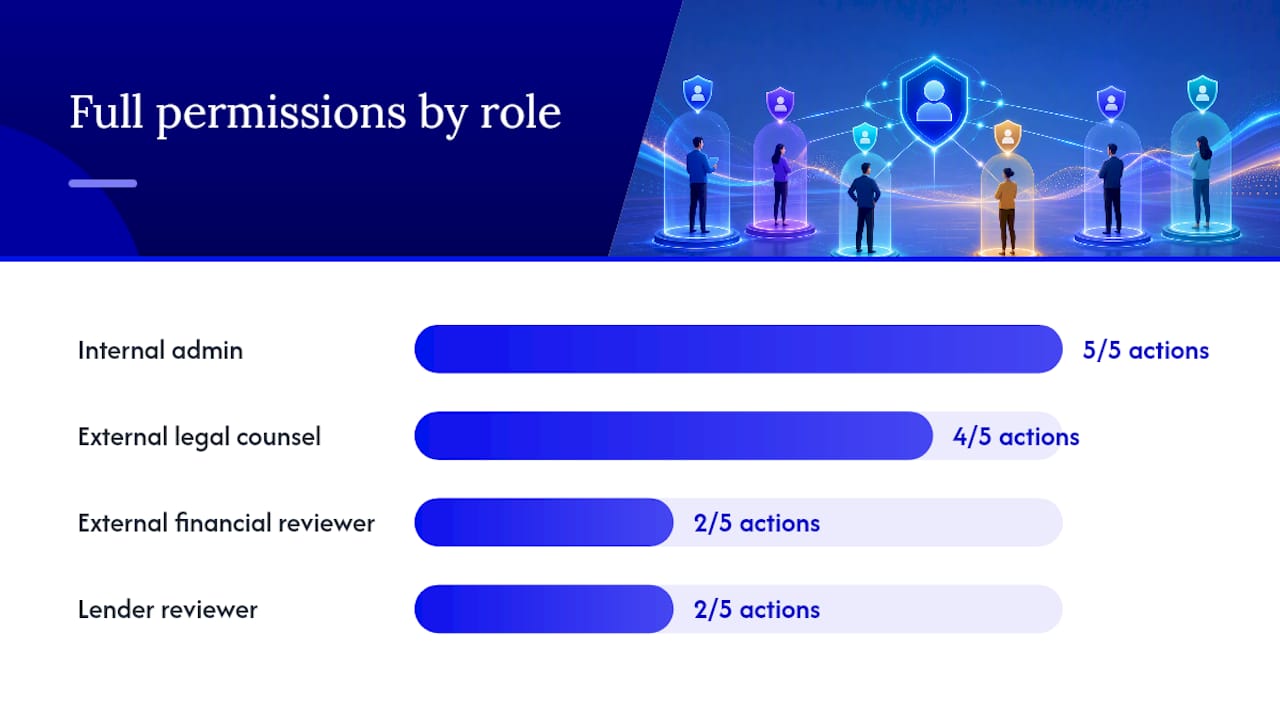
"Limited" means permitted only for non-sensitive folders. Disable downloads and printing entirely for folders containing employee data, IP assignments, and management accounts until confirmatory stage.
Security controls to enable from day one:
- NDA gating at room entry (no access without a signed NDA on file)
- Dynamic watermarking on all viewed files (user name + timestamp + IP)
- Email domain allowlisting (only pre-approved domains can receive invites)
- MFA required for all external users
- Download and print disabled for 5.0 HR and sensitive subfolders of 3.0 Legal
Audit logs are where most deal teams leave value on the table. Check them weekly, not just at close. Time spent in the financial model folder signals serious interest. Repeated downloads of a specific contract clause often mean a bidder's counsel has flagged an issue. That intelligence lets you prioritize follow-up calls and anticipate objections before they surface in a formal Q&A.
Pro Tip: For secure document sharing in CRE deals, apply the strictest permission settings first and loosen them deliberately. It is far easier to grant additional access than to explain why a sensitive file was accidentally visible.
What documents should you upload first?
A focused data room checklist covers roughly 40 core documents across corporate, financial, legal, HR, IP, and tax categories. Sell-side M&A rooms commonly scale to 500–5,000 files; Series A fundraising rooms typically hold 50–200 files. The priority order below applies regardless of deal size.
Priority upload order:
- Executive summary or CIM (the first thing every reviewer opens)
- Cap table (current, fully diluted, with option pool detail)
- 3-year summary P&L and KPI dashboard
- Audited financial statements
- Material contracts (top 5 customer agreements, key vendor agreements)
- Top-customer list with revenue concentration data
- IP assignments and patent/trademark registrations
- Employment agreements for key personnel
- Tax filings (3 years) and business licenses
- Regulatory correspondence and compliance certifications
For a pre-seed or seed raise, omit audited financials (management accounts suffice), skip detailed HR agreements, and keep the IP section to a founder assignment and any pending applications. A Series A room adds audited statements, a detailed cap table with all SAFEs and convertible notes, and a fuller legal package. Mid-market M&A rooms need everything, plus environmental reports, title documents, and for CRE deals, rent rolls, operating statements, and tenant estoppel certificates.
For file formats: use searchable PDF for all contracts (OCR-processed, not scanned images). Provide the financial model in native Excel but lock the structural formulas and include a PDF snapshot for reviewers who don't need to edit. AI document extraction tools can accelerate OCR processing and indexing for large document sets.
Upload a one-page index to the root folder. Mark any document as "coming soon" with an expected date rather than leaving the folder empty. An empty folder signals disorganization; a placeholder signals a managed process.

How do you run the sharing, Q&A, and reviewer workflow?
Invitation setup matters more than most deal teams realize. Issue a separate scoped link for each bidder group, not one shared link for all. That way, revoking one party's access doesn't touch anyone else, and the audit log stays clean by party.
A short welcome/orientation file as the room's first document reduces accidental leaks and speeds reviewer adoption. It should cover: how the folder structure works, how to submit Q&A questions, the expected response SLA, and the confidentiality reminder. Keep it to one page. Reviewers who understand the room from the start ask better questions and generate less administrative noise.
For Q&A, use the platform's built-in module exclusively. Never answer diligence questions by email. The Q&A module ties each question to a specific document or folder, routes it to the correct subject-matter expert, and creates an auditable record that survives post-close review. A practical SLA: acknowledge questions within 24 hours, provide substantive answers within 48–72 business hours. Route every answer through internal legal review before posting.
Use analytics to run the process, not just to report on it. If a bidder's team has spent significant time in the financial model folder but hasn't submitted any Q&A questions, call them. If a specific contract is being downloaded repeatedly by one party, their counsel has likely flagged something. That's a conversation to have proactively, not reactively.
Ongoing best practices: reviews, training, redaction, and compliance
A data room is not a set-and-forget exercise. Weekly audit-log reviews catch permission drift, identify stale access that should be revoked, and surface engagement patterns worth acting on. Set up automatic notifications for new file uploads so active reviewers don't have to check manually.
Version discipline is the most common failure point. When you update a financial model or a contract, replace the existing file in place rather than uploading a new copy alongside it. Two versions of the same model in the same folder will generate Q&A questions about which one is current, and that's a credibility problem you don't need.
Redaction and PII handling:
- Use true redaction tools that remove content at the file level, not visual overlays that can be reversed
- Require human review of every automated redaction pass before the file goes live
- Disable downloads for files containing personally identifiable information until confirmatory stage
- Follow sector-specific rules: HIPAA for healthcare deals, Regulation S-P for registered investment advisers, and applicable state privacy laws for CRE transactions involving tenant data
Pro Tip: Provide a one-page "quick start" guide as the room's first file. Cover the folder layout, Q&A expectations, confidentiality rules, and who to contact with access issues. This single document cuts the volume of administrative emails by a significant margin and signals that the deal team runs a tight process.
Archival is the step most teams skip until they need it. At close (or at deal termination), export the full archive: all documents in their final versions, the complete Q&A thread, and the audit log. For CRE and M&A transactions, a seven-year retention period is a common baseline, though specific deal structures and regulatory requirements may differ. Confirm the applicable period with counsel.
How much does a deal data room cost, and how long does setup take?
Setup time and cost vary more than most guides admit. A flat-rate VDR can have a functional room live in 30–60 minutes for a minimal configuration. Enterprise platforms with custom branding, SSO integration, and dedicated admin support commonly require 1–5 business days of onboarding before the room is ready for external users.
Timeline for a deal-ready room:
| Phase | Estimated Time |
|---|---|
| Pre-room prep (scope, NDA, document request list) | 1–3 days |
| Platform setup (account, branding, MFA, domain allowlist) | 2–4 hours |
| Folder skeleton build | 1–2 hours |
| Document upload and indexing | 4 hours (scales with volume) |
| QA review and mock buyer test | 2–4 hours |
| Invite and onboarding | 1–2 hours |
Cost drivers beyond the base subscription include: number of files or GB stored, number of active users, required compliance certifications (SOC 2 adds vendor cost), redaction or professional indexing services, and dedicated admin support for large auctions.
For brokers running multiple CRE financing deals per quarter, a flat-rate subscription beats per-deal pricing once you're running more than two or three rooms per year. Per-deal pricing makes sense for a one-time, high-sensitivity transaction where you want a dedicated environment with no shared infrastructure.
How does deal-room automation speed up safe setup?
Template-based room creation is the single biggest time-saver for teams running recurring processes. A reusable template should include: a pre-built numbered folder skeleton, a welcome/orientation file, a Q&A owner assignment list, and the standard NDA text. Every new room starts from that baseline, which means the folder structure is consistent, the welcome file is already there, and the permission groups are pre-configured.
CRM-triggered room creation takes this further. When a deal opportunity reaches a defined stage in your CRM, a room can be spawned automatically with the template applied, the deal name populated, and the initial permission groups created. That eliminates the manual setup step entirely for recurring deal types.
What a minimal reusable template should include:
- Numbered folder skeleton (1.0–6.0 as described above)
- Welcome/orientation file in the root folder
- Q&A owner list (who routes which question category to which SME)
- Standard NDA text pre-loaded for gating
- Default permission groups (internal admin, external financial, external legal, lender reviewer)
- Watermarking and download restrictions pre-enabled for sensitive folders
Integration with e-signature tools (DocuSign, Adobe Acrobat Sign) handles NDA execution inside the room without routing parties to a separate platform. SSO integration reduces friction for large reviewer groups at institutional counterparties. For CRE brokers, integration between the document vault and the deal pipeline CRM means activity in the room (new Q&A, new file upload) can trigger pipeline updates automatically.
Pro Tip: Build one master template per deal type (fundraising, sell-side M&A, lender diligence) and update it after every deal closes. The post-close debrief is the best time to catch what was missing from the folder structure or what generated unnecessary Q&A volume.
What experienced deal admins actually do differently
The one-page index in the root folder has saved more than one deal from a slow start. Reviewers who open a room and immediately understand what's there, what's coming, and how to ask questions move faster and generate less noise. It takes 20 minutes to write and it pays back in hours of avoided email.
Never name the room after the target company. Use a code name or a generic project reference. Room names appear in browser tabs, email notifications, and sometimes in screenshots. A room named "Acme Acquisition" is a leak waiting to happen.
Dos and don'ts for deal admins:
- Do run a mock buyer test before sending any external invites. Someone unfamiliar with the deal should be able to find the financial model in under 30 seconds. If they can't, restructure.
- Do assign a single room owner who is accountable for file updates, Q&A routing, and access changes. Shared ownership means no ownership.
- Do issue separate scoped links per bidder and revoke promptly when a party drops out.
- Don't answer diligence questions by email. Ever.
- Don't upload a new model version alongside the old one. Replace in place.
- Don't grant confirmatory-level access to a party that hasn't signed an NDA and returned a formal bid.
A mock buyer test before go-live is the single most underused quality check in deal administration. Hand the room login to a colleague who hasn't been involved in setup and time how long it takes them to find three specific documents. That test catches navigation problems that slow diligence and signal disorganization to sophisticated counterparties.
Thecrebrokersconnect handles the deal room workflow for CRE brokers
CRE brokers running multiple financing deals simultaneously don't have time to rebuild a data room from scratch for every transaction. Thecrebrokersconnect addresses that directly: the platform's secure document vault gives brokers a permanent, organized home for deal documents, with the folder structure, permission controls, and audit logging that institutional lenders and equity partners expect to see.
The platform automates the repeatable parts of the workflow. Templates handle the folder skeleton and welcome content. The deal pipeline CRM tracks lender conversations and document activity in one place. Scoped document sharing means you can send a lender exactly the files they need without exposing the full package. For brokers working with private money lenders or institutional capital sources, that level of organization signals professionalism before a single call is made.
The archive and audit log features mean every deal closes with a clean, exportable record, which matters for compliance and for the next deal where a lender asks for a track record. Start with a free trial at Thecrebrokersconnect and have your first deal room live before the end of the day.
Sources
- Valutico — Data room best practices: full guide to running an investor-ready VDR
- Carta — Data room guidance for startups