
The template you need is a free, downloadable Excel file that pairs a Schedule of Values with a draw ledger and sample filled example, available here. The one rule that prevents most funding holdups: every draw line must tie to a verifiable milestone, and your G702/G703 totals have to match to the penny. Skip either, and lenders reject the package before anyone reviews the actual work.
TL;DR:
- Ensuring the G702 and G703 totals match exactly down to the dollar is critical to avoid automatic rejection by lenders.
- Including verifiable evidence like inspection reports and photos next to percent-complete claims accelerates review and approval processes.
- Most delays stem from mismatched totals, missing lien waivers, or front-loaded draws that do not reflect actual progress.
- Adapting the draw schedule for project changes requires separate change order lines and strict version control to maintain an accurate audit trail.
- Using centralized document platforms like BrokersConnect can streamline managing multiple deals and lender conversations effectively.
Table of Contents
- Where to Get the Construction Draw Schedule Template and How to Set It Up Fast
- How Does the Draw Schedule Drive the Loan Disbursement Process?
- What Documents Belong in Every Draw Request?
- How Many Draws Should a Construction Project Have?
- Building the Spreadsheet: Tabs, Formulas, and Avoiding Errors
- Why Do Draw Requests Get Delayed, and How Do You Avoid It?
- How BrokersConnect Tools Support Draw Management
- Customizing the Draw Schedule for Residential, Commercial, and Public Projects
- Connecting the Draw Schedule to Your Project Management Software
- What Legal and Compliance Issues Affect a Draw Schedule?
- Handling Draw Schedule Revisions When the Project Changes
- What Actually Matters in a Draw Schedule (and What's Overrated)
- A Faster Way to Manage Lenders and Draw Documents
- Sources
Where to Get the Construction Draw Schedule Template and How to Set It Up Fast
A usable construction draw schedule template comes as more than a single tab. Levelset's free template bundles four pieces that matter for different reasons.
- Blank draw schedule — the working file you'll fill in for your own project
- Sample filled example — shows realistic percentages and milestone naming so you're not guessing
- Schedule of Values (SOV) tab — breaks the contract into billable line items
- Instructions tab — walks through mapping contract values to milestones step by step
Setting it up takes maybe twenty minutes. Start with the contract summary: enter the total contract amount, retainage percentage, and project dates on the summary tab. Then import or manually map your SOV. If you already have a cost breakdown from your general contractor or architect, copy those line items directly into the SOV tab rather than retyping them. Assign a percentage of the contract value to each milestone based on labor and material intensity. Framing typically eats a bigger chunk than final touches like landscaping.
Here's the quick-start sequence for your first draw submission:
- Confirm the SOV total matches the signed contract exactly, down to the dollar.
- Fill in "percent complete" for each line item based on actual field verification, not estimates.
- Let the formulas calculate earned value and balance to finish automatically.
- Cross-check the running total against your G703 continuation sheet before sending anything to the lender.
On version control: use Google Sheets when multiple people (the GC, the owner's rep, your bookkeeper) need to edit the same file in real time. Lock a copy in Excel once numbers are final and ready for lender submission, since Excel's formula protection prevents accidental edits that break your reconciliation.
Pro Tip: Add a "verification notes" column next to every SOV line so you can log the photo filename or inspection report ID that backs up your percent-complete claim. Reviewers move faster when the evidence sits next to the number instead of buried in a separate folder.
How Does the Draw Schedule Drive the Loan Disbursement Process?
The draw schedule is not just a payment calendar. It's the document that triggers every step of the disbursement lifecycle, from work completed in the field to money hitting the contractor's account. The process breaks into six stages.
- Work gets completed on site according to the milestones defined in your schedule.
- The GC or PM compiles the draw package, pulling percent-complete figures straight from the schedule.
- The architect or project manager certifies the work, confirming what's claimed actually matches what's built.
- The owner reviews and approves the package before it goes to the lender.
- The lender or a third-party inspector reviews the submission, often with a site visit.
- Funds get disbursed, usually minus retainage, once the lender signs off.
Each stakeholder checks something different. The architect verifies physical progress. The owner checks that the requested amount aligns with what they expected to owe at this stage. The lender's inspector confirms the work is real and the numbers reconcile. Turnaround varies by lender and loan size, but a package with clean documentation moves faster through the structured intake, budget review, inspection coordination, and approval sequence most lenders follow.
The Schedule of Values has to reconcile with every single draw request, no exceptions. Lenders don't investigate discrepancies. They reject and send the package back, which restarts the clock.
One recurring cause of rejection: arithmetic that doesn't tie out between the G702 cover sheet and the G703 continuation sheet. Procore's breakdown of the draw process notes that inspectors and lenders check this reconciliation first, before anything else, because it's the fastest way to catch an error.
Digital inspection tools and automated intake systems are changing how fast this review happens, surfacing exceptions earlier so they get fixed before the whole package stalls. If your lender offers a portal for submissions, use it. Manual PDF chains are where documents get lost.
What Documents Belong in Every Draw Request?
Every draw package rests on two core forms: the AIA G702, which is the summary cover sheet, and the AIA G703, the continuation sheet that itemizes the Schedule of Values line by line. The critical requirement is that these two documents match exactly. The G702 total has to equal the sum of everything on the G703. Lenders check this first, and a mismatch here is one of the most common automatic rejection triggers in the entire process.
Each SOV line on the G703 needs a few calculated fields: scheduled value, percent complete, earned value (scheduled value times percent complete), previously billed amount, current request, retainage withheld, and balance to finish. A template that shows all of these side by side lets a reviewer see prior billed amounts, the current request, retainage, and balance to finish at a glance, which speeds up approval considerably.
Beyond G702/G703, a complete package typically needs:
- Invoices from subcontractors and suppliers tied to the current draw period
- Lien waivers, both conditional (pending payment) and unconditional (payment confirmed)
- Certificates of insurance (COIs) confirming active coverage for the work period
- Inspection reports from the lender's third party or in-house inspector
- Progress photos, dated and labeled to match specific SOV line items
- Approved change orders documenting any scope or cost adjustments
- Stored materials proof when you're billing for materials on-site but not yet installed
Collecting lien waivers is usually the slowest part. You're waiting on every subcontractor and supplier to sign off, and one holdout can delay the whole submission. Set sub billing deadlines seven to fourteen days before your own submission date, and build that buffer into your project calendar from day one. Chasing five subs the night before a draw is due is how packages ship late.
Review the lender's specific document checklist before your first submission on any new deal. Requirements vary enough between lenders that assuming last project's list still applies is a common way to get bounced back on intake.
Pro Tip: Keep a running "waiver tracker" separate from your draw schedule. A missing signature from one plumbing sub can hold up a six-figure disbursement just as easily as a math error can.
How Many Draws Should a Construction Project Have?
Most residential projects run somewhere between five and eight draws. Commercial and larger developments often stretch to ten or more, tied to a longer, more granular milestone sequence. A common progression looks like this:
- Site work and permits — typically 5 to 10% of contract value
- Foundation — often 10 to 15%, reflecting concrete and structural cost
- Framing — usually the largest single draw, 15 to 20%, because labor and lumber costs peak here
- Rough-ins (electrical, plumbing, HVAC) — around 15%, split across trades
- Dry-in (roofing, windows, exterior sealing) — roughly 10%
- Interior finishes — often 20 to 25%, spread across drywall, flooring, cabinets, and paint
- Closeout and final inspection — the remaining balance, frequently held back with retainage
Treat these as benchmarks, not fixed rules. Every project's cost mix shifts these numbers, and the scheduling logic behind milestone sequencing comes down to dependencies: you can't bill for finishes before rough-ins pass inspection, so your draw schedule should mirror your actual construction sequence, not an arbitrary calendar split.
Avoid front-loading. It reads as an attempt to get ahead of actual costs, and reviewers know it. Balance draws so the cumulative percentage billed tracks closely with the cumulative percentage of work actually completed at every stage.
Building the Spreadsheet: Tabs, Formulas, and Avoiding Errors
A well-built draw schedule spreadsheet needs five tabs working together: a contract summary, the SOV, a draws ledger, a change order log, and an evidence index linking photos and inspection reports to specific line items.
The formulas that matter most:
- Earned value = scheduled value × percent complete, calculated per SOV line
- Cumulative billed = sum of all prior draws plus the current request
- Balance to finish = scheduled value minus cumulative billed
- Retainage calculation = current request × retainage percentage (commonly 5 to 10%)
- G702/G703 reconciliation check = a formula that flags when the cover sheet total doesn't equal the sum of the continuation sheet, so you catch the error before submission, not after rejection
Lock these formulas once the structure is finalized. Use named ranges for the contract total and retainage percentage so a typo in one cell doesn't silently break five downstream calculations. Timestamp every update in a dedicated column, since lenders and owners both want a clear audit trail showing when a percent-complete figure changed and why.
Watch for circular references, especially in retainage formulas that reference cumulative totals which themselves depend on retainage. If Excel throws a circular reference warning, restructure so retainage calculates off the current draw amount only, not a running total that includes itself.
Pro Tip: Use Google Sheets during active construction when the GC, architect, and owner's rep all need to update the same file simultaneously. Switch to a locked Excel version the moment you're ready to submit to the lender, so nobody can accidentally shift a formula after the numbers are final.
Why Do Draw Requests Get Delayed, and How Do You Avoid It?
Most funding delays trace back to the same handful of preventable mistakes.
- Mismatched totals between the G702 and G703, the single most common automatic rejection trigger
- Vague milestone language like "framing 80% complete" with no supporting detail on what's actually done
- Missing lien waivers from one or two subs, holding up the entire package
- Front-loaded draws that don't match actual construction progress
- Unapproved change orders billed as if they were part of the original contract
The fix starts with process, not software. Set sub billing deadlines a week to two weeks ahead of your submission date, since assembling waivers from every subcontractor and supplier is frequently the true critical path. A draw package can balloon from a short packet to hundreds of pages once every waiver, invoice, and stored-materials receipt gets attached, and chasing those documents at the last minute is where timelines slip.
Build a pre-submission QA checklist: reconcile G702/G703 totals first, confirm every percent-complete figure has a matching photo or inspection note, verify all waivers are signed and dated, and check that any change order has written owner approval before it appears on the SOV.
Standardize photo and file naming across the whole project team, something like "SOVline12_Framing_Photo1_Date," so nobody wastes time hunting through folders during review. Keep one single source-of-truth file for the current draw schedule version, shared through a controlled link rather than emailed copies that drift out of sync.
Pro Tip: Run your QA checklist the day before submission, not the morning of. Catching a mismatched total with 24 hours to spare beats discovering it after the lender has already bounced the package.
How BrokersConnect Tools Support Draw Management
Managing draws across several active deals gets complicated fast when documents live in scattered email threads. Platforms built for commercial real estate brokers, including BrokersConnect, centralize document storage and let you track lender conversations alongside deal-specific files. That matters most once you're juggling multiple lenders and multiple projects simultaneously, where a shared spreadsheet alone starts breaking down. For a single project with one lender, a well-built Excel template is often all you need.
Theron covers construction financing and broker workflow for BrokersConnect's editorial team.
Customizing the Draw Schedule for Residential, Commercial, and Public Projects
A residential remodel and a public infrastructure project don't share a milestone structure, even though both use the same G702/G703 framework underneath.
Residential projects usually run simpler draw schedules, five to eight draws tied to visible construction phases: foundation, framing, rough-ins, finishes, closeout. Owners often review draws personally rather than through a formal committee, so documentation can be lighter, though lien waivers still matter just as much for protecting against mechanic's liens.
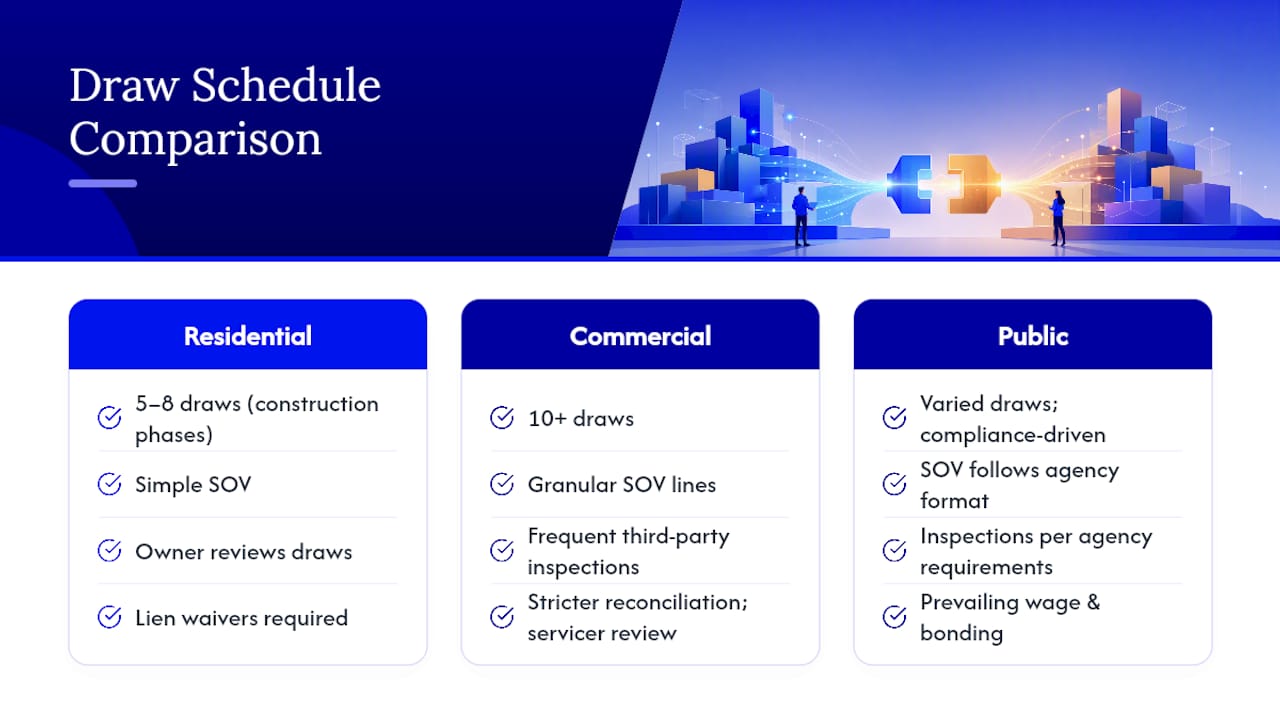
Commercial projects typically need more granular SOV lines because multiple trades and larger dollar amounts are involved. Expect ten or more draws, more frequent third-party inspections, and stricter reconciliation requirements since commercial lenders often have dedicated construction loan servicing teams reviewing every submission line by line.
Public projects carry additional compliance layers: prevailing wage documentation, bonding requirements, and often a public agency's own draw request format that supersedes a standard template. Retainage rules can also differ, sometimes set by statute rather than lender preference.
Whatever the project type, the underlying template structure holds. Adjust the number of draws, the granularity of the SOV, and the supporting documentation to match the project's complexity and the lender or agency's specific requirements. Check those requirements before building your schedule, not after your first submission gets rejected for using the wrong format.
Connecting the Draw Schedule to Your Project Management Software
A spreadsheet works fine for single projects with one lender, but friction shows up once you're running multiple jobs at once or coordinating with an accounting team that needs draw data feeding into their books automatically.
Many construction project management platforms let you export percent-complete data directly from field reports into a draw schedule format, cutting out manual re-entry that introduces errors. Accounting software integration matters most for the earned-value and retainage calculations, since those numbers need to match what's booked in your general ledger exactly. A mismatch between your draw schedule's retainage figure and your accounting system's retainage liability account is its own kind of red flag during an audit.
If your team is deciding whether to formalize this connection, the construction software terminology involved in takeoff, scheduling, and ERP systems is worth understanding before you commit to a platform, since vendors use overlapping terms for different features. Start simple: export your draws ledger tab to a CSV and confirm your accounting software can ingest it cleanly before investing in a deeper integration. For most small to mid-size contractors, this manual export step works fine for years before a full software integration becomes worth the setup cost.
What Legal and Compliance Issues Affect a Draw Schedule?
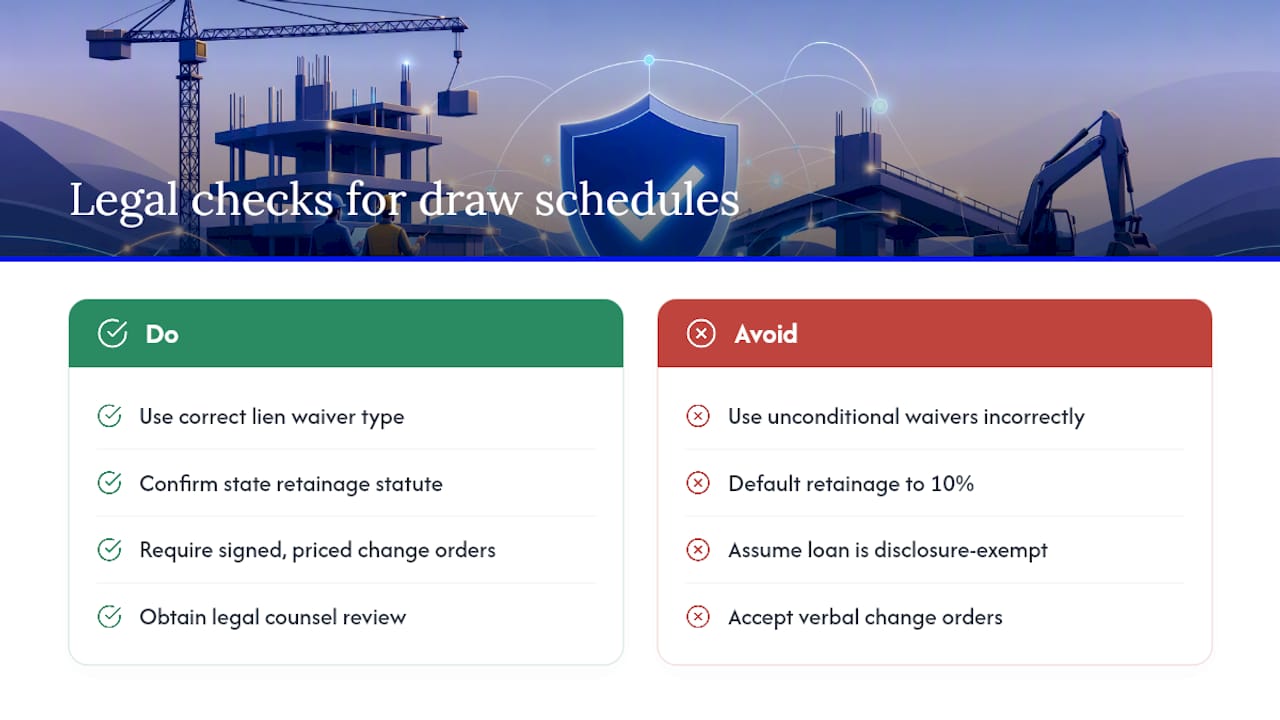
Lien waivers exist because they protect the owner and lender from a subcontractor filing a mechanic's lien after being paid. Get the waiver type wrong, unconditional when it should be conditional, and you can create a legal gap where a sub who wasn't actually paid could still lien the property despite the owner having released funds.
Retainage rules vary by state and sometimes by project type, particularly on public work where statutory retainage caps often apply regardless of what the contract says. Confirm your state's specific retainage statute before setting that percentage in your template rather than defaulting to a common 10% figure.
Loan disbursement practices connect to broader consumer lending regulation. The Consumer Financial Protection Bureau maintains Truth in Lending disclosure rules that govern certain construction loan disclosures, particularly on owner-occupied residential projects. Commercial construction loans generally fall outside these specific consumer protections, but it's worth confirming which rules apply to your specific loan structure before assuming a commercial deal is exempt from every disclosure requirement.
Change orders need written approval before they hit the draw schedule. A verbal agreement to add scope, even from the owner directly, creates a documentation gap that can turn into a payment dispute later. Every change order should carry a signature and a dollar figure before it's reflected in any SOV line adjustment.
None of this replaces legal counsel review of your specific contract and lien waiver language. State lien laws differ enough that a waiver form valid in one state may not fully protect you in another.
Handling Draw Schedule Revisions When the Project Changes
Change orders are the most common trigger for a draw schedule revision. When scope shifts, whether it's an owner-requested upgrade or an unforeseen site condition, the SOV needs updating before the next draw, not retroactively folded into a request without documentation.
The cleanest approach: keep a dedicated change order log as its own tab, separate from the main SOV. When a change order is approved, add a new line item with its own scheduled value and percent-complete tracking, rather than adjusting an existing line's total and losing the audit trail of what the original contract actually specified.
Timing delays also force revisions. If a project stalls mid-framing for six weeks, your draw schedule's assumed sequence may no longer match reality, and lenders generally want to see an updated schedule reflecting the actual revised timeline rather than one that still assumes the original pace.
Version control matters here more than almost anywhere else in the process. Label each revision with a date and a brief change summary, and never edit a draw schedule that's already been submitted for a specific draw. Create a new version instead, so there's a clear record of what the lender approved at each stage. Losing that trail is how disputes happen months later when nobody can agree on what the schedule originally said.
What Actually Matters in a Draw Schedule (and What's Overrated)
Most advice on this topic obsesses over template aesthetics: color coding, dashboard tabs, fancy conditional formatting. None of that prevents a rejected draw. What prevents a rejected draw is arithmetic that reconciles and milestones specific enough that an inspector can verify them without a phone call.
The conventional wisdom undersells how much of this process is really about documentation logistics, not construction management. Chasing lien waivers from a dozen subs is often the actual bottleneck, not disagreements over percent-complete. Teams that treat waiver collection as a scheduling problem, with real deadlines built into the sub contracts themselves, submit cleaner packages than teams that treat it as an afterthought.
If you take one thing from this: build your G702/G703 reconciliation check into the spreadsheet formula itself, so a mismatch throws a visible error before you ever hit send. That single habit prevents more delays than any amount of milestone planning polish.
— Theron
A Faster Way to Manage Lenders and Draw Documents
A solid Excel template solves the math. It doesn't solve the other half of the job: finding lenders who actually want to fund your project type and keeping every draw document straight across multiple active deals. BrokersConnect gives brokers a centralized document vault alongside AI-powered lender matching, so instead of juggling separate spreadsheets and email chains per deal, your submissions, lender conversations, and draw documents live in one place tied to a database of 289+ verified lenders.
That matters most once you're running construction financing across several borrowers at once, where a shared spreadsheet stops scaling and lender outreach starts eating hours you don't have. Explore the deal pipeline management tools built into the platform, or start a free trial at Thecrebrokersconnect to see how lender matching works for your next construction deal.
Sources
- The Construction Loan Draw Request Process, Explained | Procore
- Construction Draw Schedule Template | Free Template | Levelset
- Regulation Z (Truth in Lending) references | Consumer Financial Protection Bureau